How to Automate Web Design Lead Generation (Without Hiring an SDR)
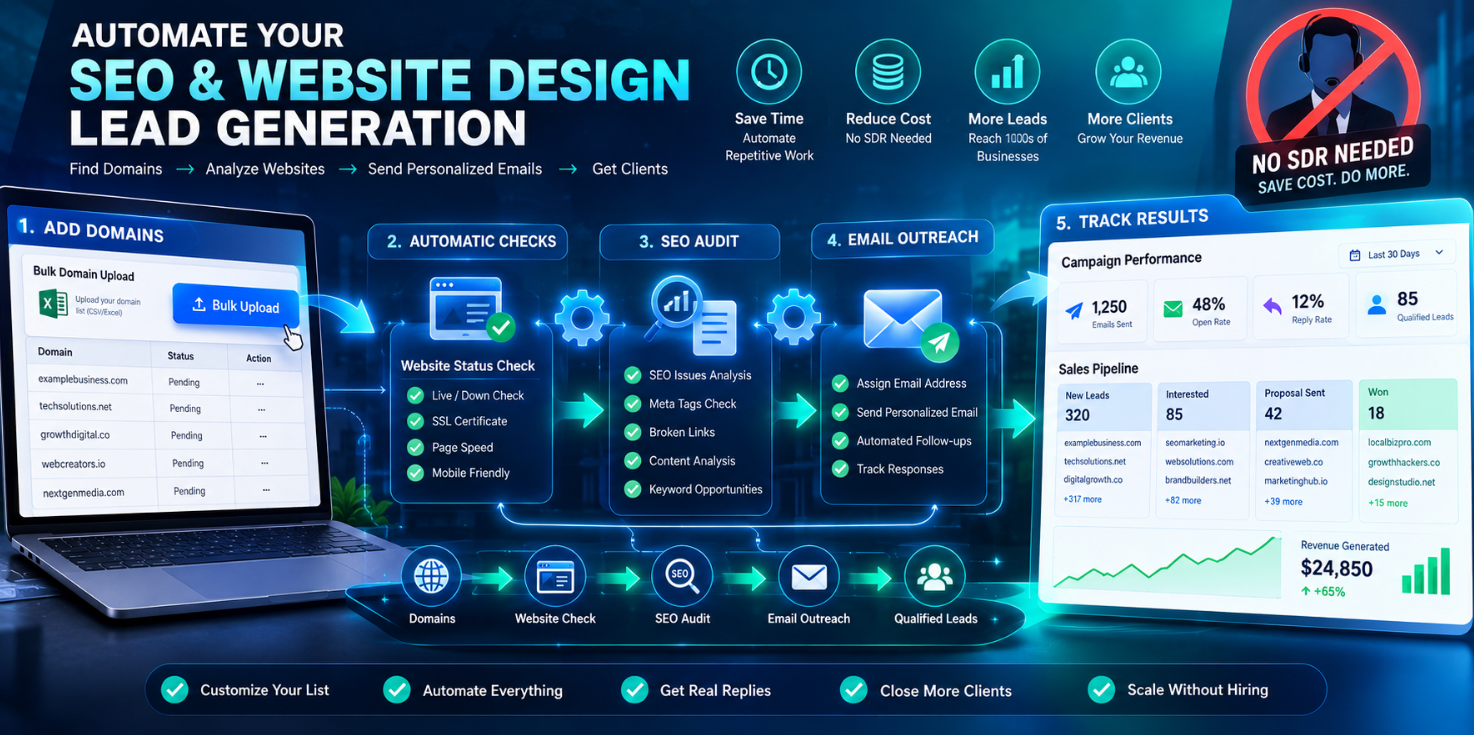
In the digital services industry, hiring a Sales Development Representative (SDR) has long been the standard approach to acquiring clients. But most agencies and freelancers overlook a critical fact: managing a two-person SDR team can cost up to $330,729 annually, including salaries, tools, management overhead, and recruitment costs.
What's more concerning is that this investment doesn't guarantee a steady flow of leads. SDRs require continuous training, supervision, and motivation, and turnover rates in sales remain notoriously high. Every departure means restarting the recruitment and training cycle.
For agencies with limited resources, pouring money into a costly and uncertain channel is a strategic risk. This is where automation delivers its value: replacing repetitive labor with technology so you can scale lead generation without increasing headcount.
The Core Logic Behind Automated Lead Generation
Automated lead generation isn't about replacing humans with machines. It's about redesigning the entire process so technology handles repetitive tasks while you focus on what truly requires human judgment, consultations, closing deals, and maintaining client relationships.
A complete automated lead generation system has four key components:
Domain data collection : Build prospect lists from public sources
Automated SEO audits : Batch-analyze website health
Conditional email assignment : Send different messages based on website status
Engagement tracking and pipeline management : Monitor opens, replies, and move deals forward
This system works because it solves the fundamental problem of traditional outreach: information asymmetry. When you can quickly identify which websites have problems and which businesses need help, your communication shifts from "selling" to "solving."
Step 1: Domain Data Collection and Lead Discovery
Everything starts with data. You need a prospect Domain Data list, and obtaining one is simpler than you might think.
Local business search is the most direct starting point. By searching Google Maps for businesses in specific industries and locations, you can quickly build a foundational list. The n8n workflow template demonstrates how to scrape Google Maps search results through Decodo, extracting business names, addresses, phone numbers, websites, and ratings, then automatically storing this data in Google Sheets.
For teams seeking more precise lists, you can read pre-set postal codes and business categories from Google Sheets, then query matching businesses through the Google Maps API. The system visits each business's website and extracts publicly available email addresses. This approach requires no paid scraping tools, it relies entirely on public data.
WHOIS data is another undervalued lead source. Domain registration records contain registration dates, registrant information, and contact details. By filtering for recently registered domains, you can reach businesses at the moment they're just getting started, a window competitors haven't discovered yet.
Step 2: Automated SEO Audits
Once you have a domain list, the next step is analyzing each website's health. This not only helps you identify problems but also provides specific material for your outreach messaging.
The combination of DataForSEO and Claude offers an efficient automation solution: input a company name and website URL, and the system automatically scrapes website content, analyzes the business model, then retrieves technical metrics, backlink profiles, keyword rankings, and site health through the DataForSEO API, ultimately generating a complete SEO audit report.
The value of this automated auditing lies in speed and scale. Traditionally, completing a detailed technical audit might take 30 minutes to several hours. An automated system can process dozens of websites in minutes with consistent output formatting, making comparison and prioritization straightforward.
The audit results themselves become a powerful marketing tool. When you show potential clients exactly what's wrong with their website, you're no longer selling services, you're providing a diagnosis.
Step 3: Conditional Email Campaigns
This is the most differentiated component of the entire automation system. Traditional bulk email marketing uses the same template for all recipients, but conditional marketing automatically selects the most appropriate communication approach based on each lead's specific situation.
Based on website status, your system can automatically assign different outreach templates:
| Website Status | Email Template | What It Says |
|---|---|---|
| Working site with SEO issues | SEO service email | Attached basic audit report explaining how to improve rankings |
| Site down or parked | Website rebuild email | Explains the customers and opportunities they're missing |
| Outdated technology stack | Modernization email | Highlights performance and security risks |
n8n's AI sales agent workflow demonstrates a more advanced implementation: the system not only sends personalized cold emails but also reads and interprets replies, updates CRM records, and even writes contextually appropriate responses. Every received email is parsed and sent to GPT-4o for structured classification, detecting unsubscribe requests, auto-replies, or human responses, extracting intent, sentiment, and urgency, and determining the next best action.
For teams that prefer manual control over sending cadence, another workflow provides a Google Sheets-based daily email solution: the system automatically retrieves lead data, sends personalized emails at scheduled times, and verifies email deliverability before sending.
Step 4: Tracking Engagement and Optimizing Conversion
Sending emails is just the beginning. The real value lies in tracking who opened your emails, who clicked your links, and who replied.
By embedding unique tracking pixels, you can monitor each email's open status. When a recipient opens the email, their email client loads this hidden 1×1 image, triggering your webhook and recording the open event. This tracking method requires no external email marketing platform, it's entirely handled within n8n.
More advanced workflows use SendGrid webhook events to track opens, clicks, bounces, and spam reports, then prioritize classification based on event type, ensuring CRM data stays current.
When someone replies, AI can automatically classify the response as "interested," "not interested," or "other," and take different follow-up actions based on classification. Interested leads are flagged as hot and pushed to your Slack or Telegram, while uninterested ones are automatically removed from the sequence.
Real-World Application: An Automation Workflow Example
Let me illustrate how this system works using a specific n8n workflow:
Every Monday at 9 AM, the workflow starts automatically.
Step 1: Decodo scrapes Google Maps search results for your target industry and city, extracting business details and storing them in Google Sheets.
Step 2: The system checks whether each lead has a website. Leads without websites are flagged and skipped, they likely need a completely new website build.
Step 3: For leads with websites, Decodo scrapes site content, and OpenAI scores the business, summarizing company type, pain points, and contact email.
Step 4: The system filters qualified leads based on score thresholds, website existence, email availability, and contact status.
Step 5: For each qualified lead, OpenAI writes a personalized outreach email, Gmail sends it, and the lead status updates to "contacted."
The entire process, from data collection to email sending, is fully automated. You set it up once and simply check the results every Monday morning.
Start Building Your Automation System
Automating web design lead generation isn't about technology itself. It's about freeing your time to do what truly matters: consulting, closing deals, and delivering excellent work.
Start with one component. Choose a platform you're familiar with, n8n offers numerous free pre-built workflow templates, and Google Sheets serves as near-zero-cost data storage. Implement domain collection and basic auditing first, then gradually add email automation and tracking.
Once you complete your first automation cycle, you'll find that lead generation is no longer an anxiety-inducing daily task. It becomes a stable, running system, one that doesn't require an SDR, doesn't need your manual operation every day, and keeps working while you sleep.
Ready to automate your lead generation? GetWhoisDB helps you find prospects through domain intelligence, automated website audits, and conditional email campaigns, all from one dashboard. Start your free trial today.